J-RETRO 01
Active/Passive Retro-Fit for J-Style Basses
Overview
The J-RETRO 01 is designed to fit directly into standard “Jazz” style basses without modification, including a PP3 battery. Its high-quality circuit uses three stacked knobs and includes an active blend circuit plus a 3-band equalizer with bass, variable frequency mid, treble, and bright function.
Key Feature: The active blend circuit prevents the signal loss associated with many passive basses where, when both pickups are up full, the signal from one pickup feeds into the other and vice versa. However, a switch is included to allow a passive equal mix of both pickups.
Backup Mode: A second switch – a basic “get-you-out-of-trouble” passive mode – is included in case the battery dies in crucial circumstances, but this mode allows usable settings too.
Power System
The power is switched on automatically when a mono jack is plugged into the socket.
Control Layout
- VOLUME & BLEND: Knob stack nearest the neck pickup
- BASS & TREBLE: Middle knob stack
- MID LEVEL & FREQUENCY: Knob stack nearest the jack
- ACTIVE/PASSIVE SWITCH: Located by the jack output
Pre-Installation Checks
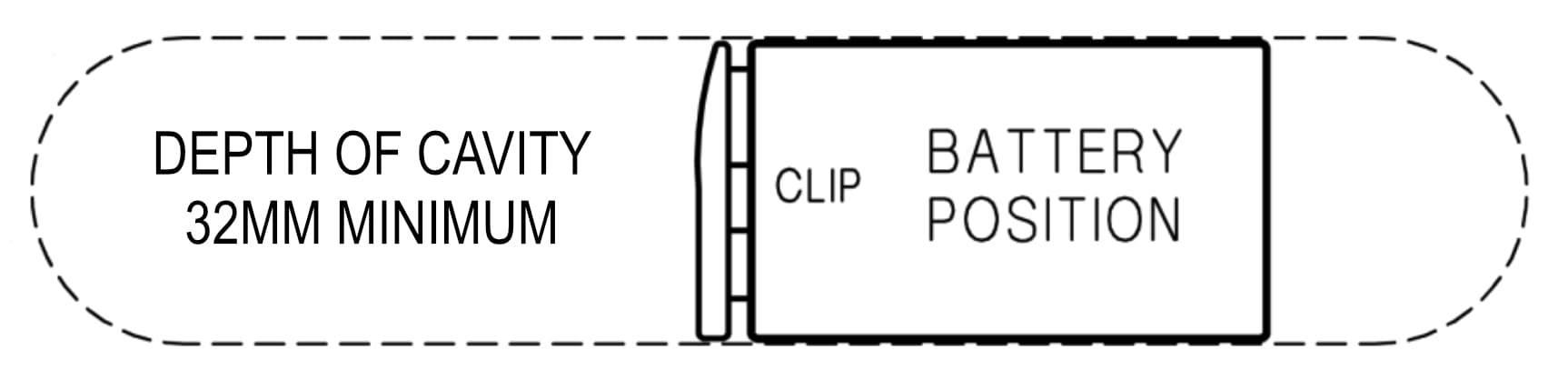
Important: Before installation, check that your bass’s cavity is wide enough to accommodate a PP3 battery and has a minimum depth of 32mm for proper clearance.
Pre-Installation Test Setup
Pre-Installation Test Setup Diagram

J-Retro Controls Diagram
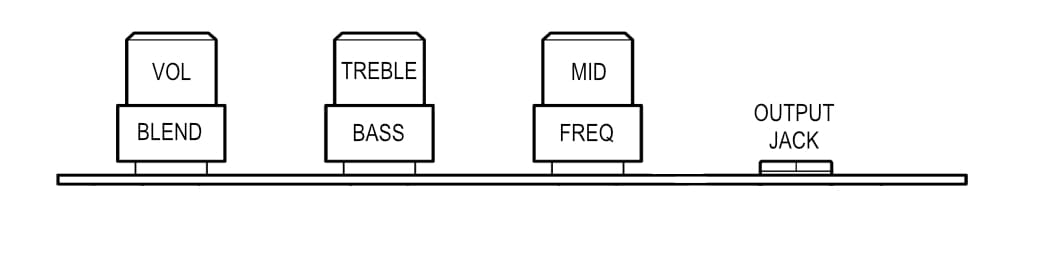
- Connect a 9v battery to the battery clip.
- Get a high-quality audio player with a 3.5mm output socket and cue a track with broad frequency range.
- Use the trailing test jack plug from the pre-amp to connect to your audio source.
- Turn down the input level of your bass amp or similar high quality audio input.
- Connect a mono instrument lead between the output jack of the preamp and the input of your bass rig and increase the level to normal.
- Set the ACTIVE/PASSIVE switch (by the jack) towards the jack for active mode.
- Turn up the Volume knob and test that sound is coming through your bass rig.
- Test the Blend control by turning it fully clockwise (neck pickup) and anti-clockwise (bridge pickup) and ensure sound is heard evenly in both states.
- Play with the Bass, Treble, and Mid controls to ensure they’re functioning.
Tools & Materials Required
- A small screwdriver (1.8 mm) for the pickup screw terminals
- A soft cloth or chamois-type fabric to protect the instrument surrounding the cavity
- A Posi or Phillips crosshead screwdriver to suit the existing control plate screws
Need Help?
If you’re unsure about any part of the pre-installation testing, contact a qualified guitar technician or reach out to East UK for assistance.
Control Layout & Functions
VOLUME & BLEND
Volume (Upper Knob): This knob has active circuitry after it so that the feed to your amplifier is a low impedance drive.
Blend (Lower Outer Knob): Turn it fully clockwise for the neck pickup alone and fully anti-clockwise for the bridge pickup. The midway position, which has an indent, gives an equal mix of both pickups. The balance between the pickups is continuously variable with progressive level compensation towards the single pickup settings.
Important: The Pickups switch (by the blend) must be set pointing towards the jack for the Blend to function.
BASS & TREBLE
Treble (Upper Knob): Boost and cut control (+12dB@3 kHz, -12dB@ 1kHz). The central ‘flat’ position is indented. The cut settings work on lower frequencies compared to boost to give deeper sound when the top is rolled off.
Bright Function: Pull the Treble knob for the Bright setting (+8dB@7kHz).
Bass (Lower Outer Knob): Boost-only Bass control (+15dB@50Hz). The frequency band of boost gets progressively lower as the boost is increased. An indent midway is included to aid the setting of this control.
MID LEVEL & FREQUENCY
Mid Boost/Cut (Upper Knob): Controls the amount of Mid boost or cut (+/- 12dB) at frequencies according to the setting of the Frequency knob. The midway indent is the ‘flat’ position.
Frequency (Lower Outer Knob): Continuously variable and sets the Mid frequencies for boost or cut (150Hz – 3kHz).
ACTIVE/PASSIVE SWITCH
Location: By the jack output
Active Mode: Switch towards the jack for active mode
Passive Mode: Switch opposite direction for passive mode
Power: The power is switched on automatically when a mono jack is plugged into the socket.
Active & Passive Control Functions
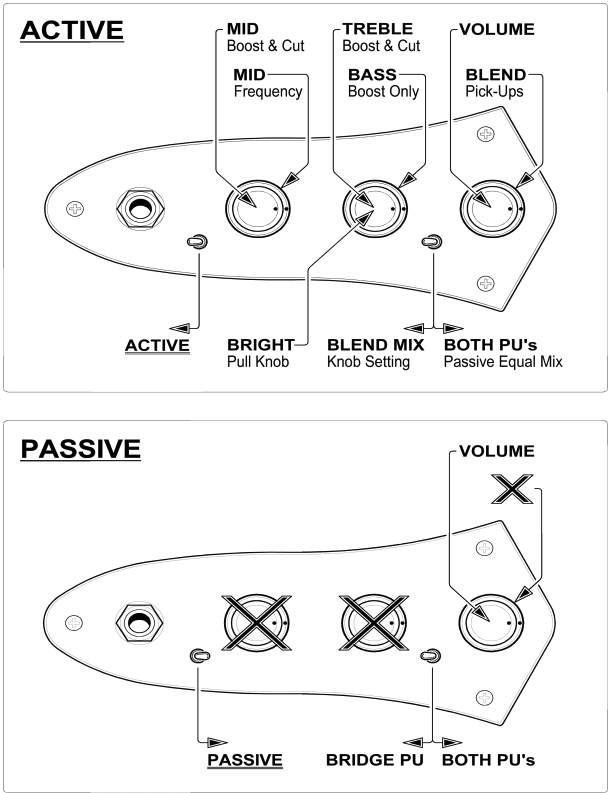
Active & Passive Knob Control Functions Diagram
ACTIVE MODE FUNCTIONS
MID: Boost & Cut + MID Frequency
TREBLE: Boost & Cut
BASS: Boost Only
VOLUME: Active
BLEND: Pick-Ups Blend
BRIGHT: Pull Knob
BLEND Mix: Knob Setting
BOTH PU’s: Passive Equal Mix
PASSIVE MODE FUNCTIONS
VOLUME: Standard Volume Control
PICKUP SELECTOR: Bridge, Neck, or Both
BRIDGE PU: Bridge Pickup Only
BOTH PU’s: Both Pickups
NOTE: EQ controls are bypassed in passive mode
Installation & Connections
IMPORTANT
A crucial factor for the installation of a J-RETRO 01 Pre is the size of the routed slot. These do vary slightly from bass to bass. Although the pre-amp is likely to fit without a problem, it’s an absolute must to check that the slot is wide enough to take a PP3 battery. The depth is important too, which ideally needs to be a minimum of 32mm to allow a little clearance.
East UK cannot take responsibility for incorrect installation, any injury or loss caused as a result of installation. If in doubt, please contact a suitably skilled guitar technician for help in completing the installation correctly, or contact East UK for advice.
Installation Steps
- Lay some soft cloth to protect the bass surrounding the cavity. Unscrew the 3 screws for the ‘bell’ plate on your bass and lift it out. Place the existing control plate assembly on the cloth.
- Take several photos and make a note of where all the wires from the bass are connected to on the original plate so it can be returned to original later if required. Disconnect all the wires and remove the plate.
- Make sure the J-RETRO 01 and its battery will fit in the cavity before connecting the wires.
Side view of the J-RETRO in the bass showing connections
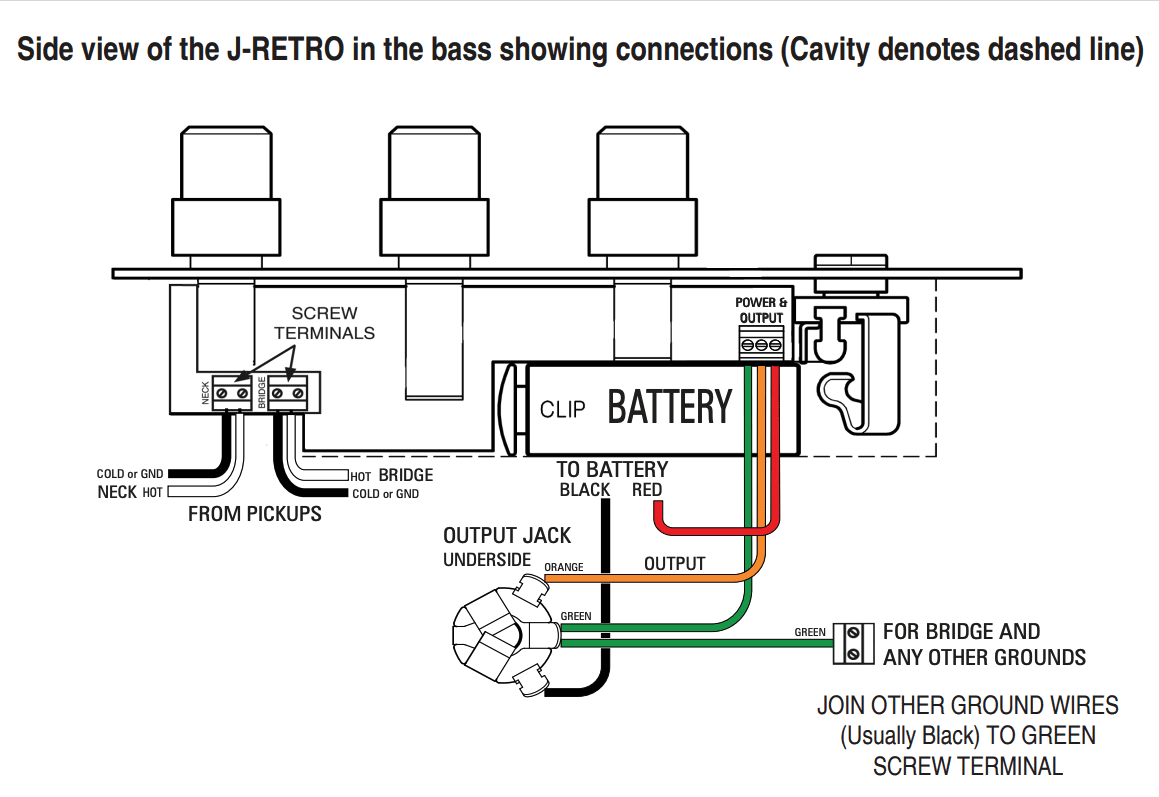
Cavity denotes dashed line. Follow wiring connections as shown.
- Place the J-RETRO 01 on the leather or cloth protecting the bass and connect the wires using the screw terminals according to the connection diagram.
- Clip the battery onto the battery clip and lay it into the cavity according to the diagram below.
Top view of bell plate showing battery position
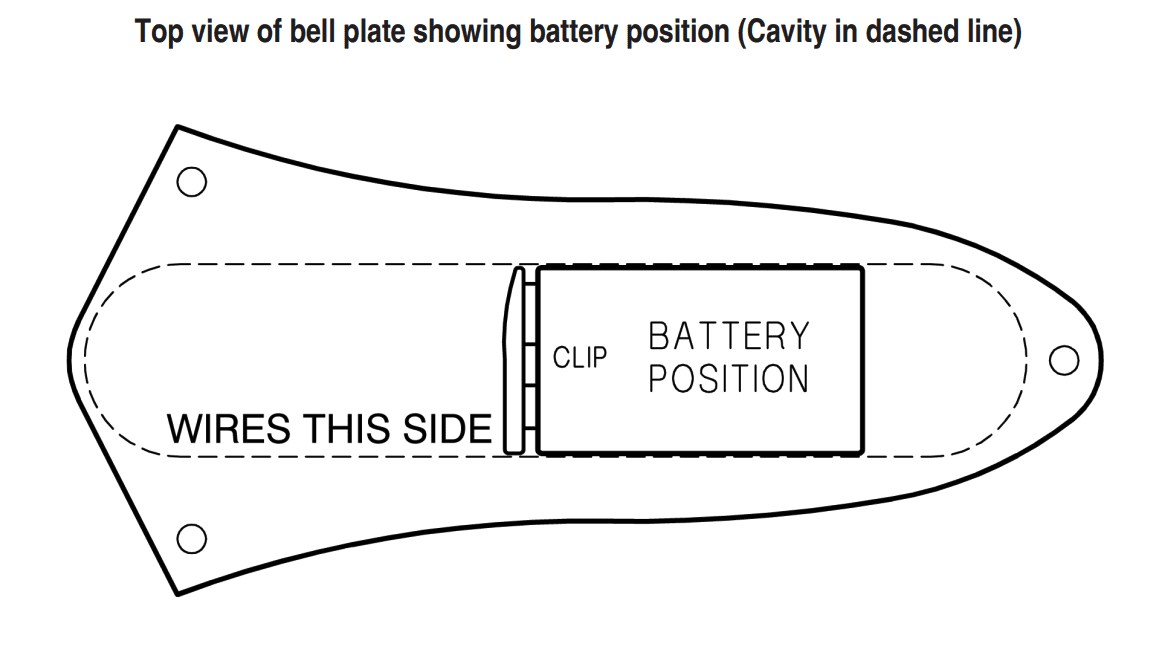
Cavity shown in dashed line. Ensure battery fits properly before final assembly.
- Before fitting the new plate make sure all the wires, including the battery wires, will not be trapped in any way by the circuit board or any other part of the pre-amp. Fit using the original 3 screws.
Features & Technical Specifications
Technical Features
- Active blend circuit prevents signal loss that occurs in many passive basses when both pickups are at full volume
- Switch allows for passive equal mix of both pickups
- Automatic power switching when mono jack is inserted
- PP3 battery compatible
- Direct fit for standard Jazz bass cavities
Pickup Gain Adjustment
Pickup Gain Adjustment Diagram
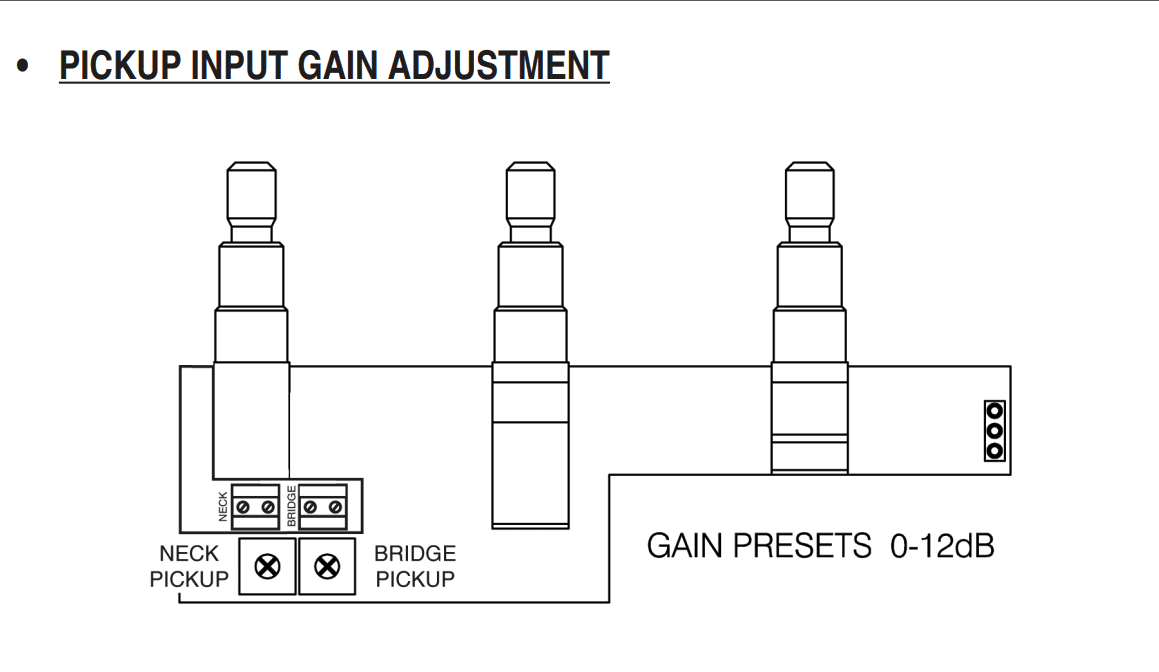
GAIN PRESETS: 0-12dB adjustment range for fine-tuning pickup input levels
Purpose of Gain Adjustment
The J-RETRO 01 includes internal gain adjustment controls that allow you to fine-tune the input level from each pickup. This is particularly useful for:
- Balancing pickup outputs: Ensuring both neck and bridge pickups have similar output levels
- Compensating for weak pickups: Boosting the signal from older or weaker pickups
- Matching different pickup types: Adjusting when mixing different pickup brands or types
Technical Specifications
| Specification | Details | Notes |
|---|---|---|
| EQ Bands | 3 (Bass, Mid, Treble) | Plus bright function |
| Bass Control | +15dB @ 50Hz | Boost only |
| Mid Control | ±12dB, 150Hz-3kHz | Variable frequency |
| Treble Control | ±12dB @ 3kHz/1kHz | Boost and cut |
| Bright Function | +8dB @ 7kHz | Pull treble knob |
| Battery | 9V PP3 | Alkaline recommended |
| Power Switching | Automatic | When mono jack inserted |
| Cavity Depth | Minimum 32.5mm | For PP3 battery clearance |
Note: The J-RETRO 01 is designed to fit standard Jazz Bass cavities without modification. Always verify cavity dimensions before installation.
Warranty Information
Guarantee
Your East product is guaranteed to be free from defects in materials and workmanship for a period of one year from the date of original purchase.
If during the guarantee period your product becomes faulty due to defective materials or workmanship, then the unit will be repaired or replaced without charge for parts or labour at the discretion of East UK, according to the conditions below.
Conditions
- The original sales invoice or receipt indicating the date of purchase and sales outlet is presented together with the faulty unit.
- The unit was installed competently consistent with the instructions supplied.
What Is Not Covered
- Damage due to accident or improper handling, installation or operation.
- Defects caused by the instrument or system to which the unit has been installed.
- Damage resulting from repair of the unit carried out by non-authorised service personnel.
- The costs of transport or shipping costs relating directly or indirectly to the guarantee of this product.
Proper Disposal
To dispose of electrical goods safely, follow these simple steps:
Check Local Rules
Find out if there are any specific laws in your area about disposing of electrical waste. Many regions have special regulations for electronic equipment.
Recycle
Take your old electrical items to a local recycling centre. They can handle many types of electronics and appliances and ensure materials are properly processed.
Donate
If your item still works, consider donating it to a bass player who has yet to discover the wonders of our active bass technology.

By disposing of your electrical goods properly, you help protect the environment!
East UK Customer Service
For technical support or warranty inquiries, please contact:
www.east-uk.com | tech@east-uk.com